
What are Tax Settings and how do they affect my invoices?
Last updated:
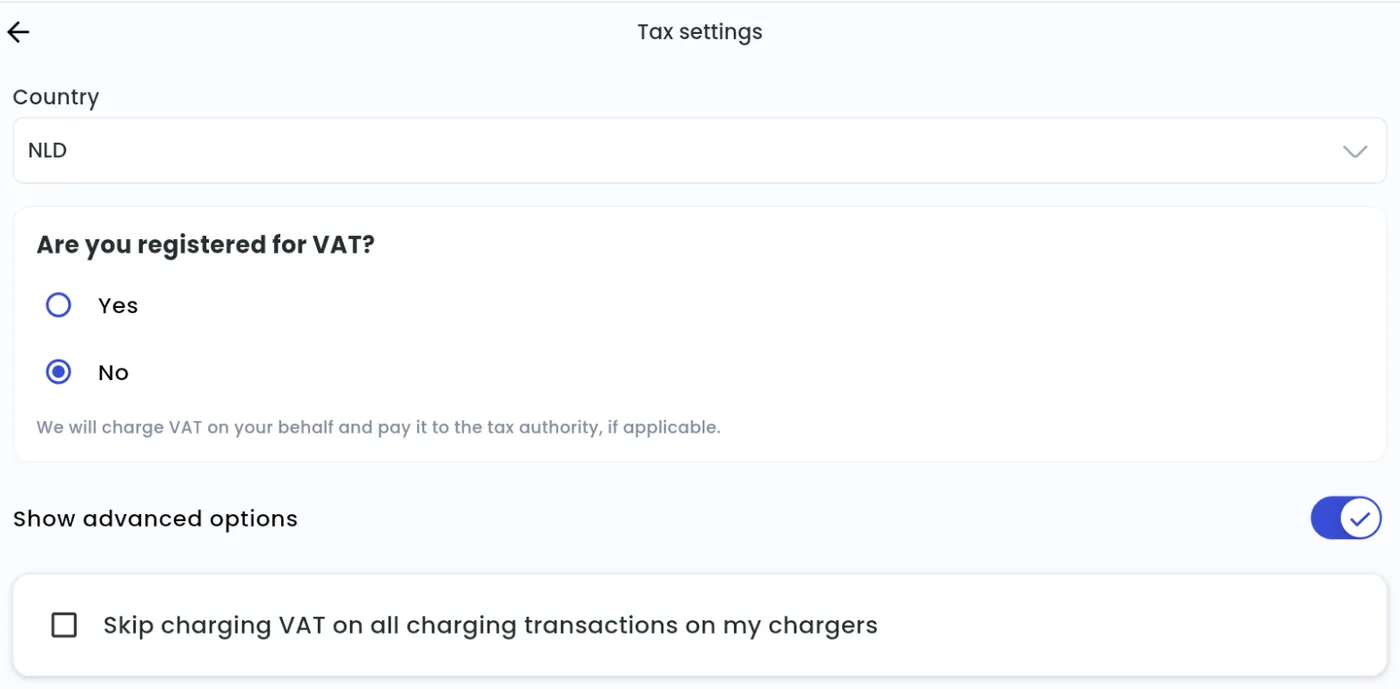
Your tax settings decide whether your summary invoices include VAT. Under Are you registered for VAT? you choose:
- Yes — for VAT-registered businesses. Enter your VAT ID. Your summary invoices and payouts include VAT.
- No — e.g. for non-profits. Your summary invoices have no VAT. VAT is still charged on your sessions: Tap charges it on your behalf and pays it to the tax authority, if applicable.
Under Show advanced options, you can also choose Skip charging VAT on all charging transactions on my chargers. This is for places such as private homes where electricity isn’t sold structurally, and where you’ve agreed with your tax advisor that you aren’t required to pay VAT on these transactions. Tap can’t advise you on when to choose this option.
You’ll find your monthly invoice and the summary of sessions paid out to you (including any VAT) under Admin > Account > Invoices.
Edit your tax settings
Section titled “Edit your tax settings”- With Manage selected at the top, go to Account > Settings > Tax settings
- If you operate in more than one country, select the country.
- Answer Are you registered for VAT? and enter your VAT ID if you have one.
- Tap Confirm.
-
Admin > Account > Settings > Taxes > Manage
-
If you operate in more than one country, select the Country.
-
Answer Are you registered for VAT? and enter your VAT ID if you have one.
-
To stop charging VAT, switch on Show advanced options and tick Skip charging VAT on all charging transactions on my chargers.
-
Click Confirm.
To add a country, see What are country settings and why do I need to set one?.